
Hybrid Cloud Implementation Services: Which Model Is Best for Your Business?
Discover how hybrid cloud implementation services help businesses combine private and public cloud environments for better security, scalability, cost optimization, and performance. Learn which hybrid cloud model best fits your business needs and supports long-term digital transformation.
09
Oct
Hybrid Cloud Implementation Services: Which Model Is Best for Your Business?
Published 09 Oct 2026 Updated 09 Oct 2026 Written and reviewed by Anshul Goyal
Hybrid Cloud Implementation Services facilitate the integration of private infrastructure with the public cloud and edge computing. It's not necessarily the best choice just because a solution embraces cloud technology. For most SMEs, a tiered hybrid model offers the best balance as workloads are run where they can best satisfy their security, performance, scalability, and cost requirements.
According to NIST, hybrid cloud is defined as a combination of two or more separate cloud infrastructures that are still able to interoperate.
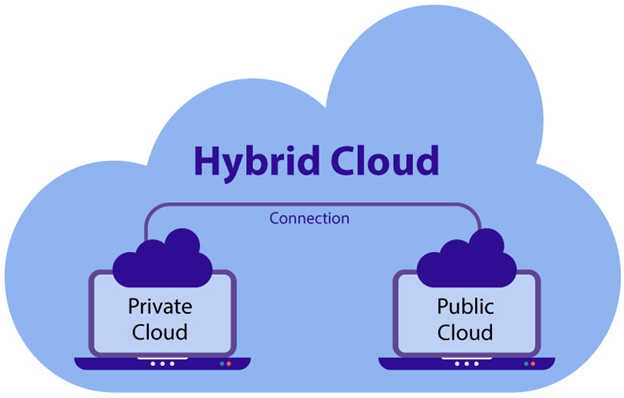
The best hybrid cloud model depends on the workload. Use tiered resources for gradual modernisation and a private-first model when it comes to dealing with regulated data.
-
1. Tiered hybrid is the best starting point for many businesses.
-
2. Sensitive workloads can remain private while public cloud supports scalable services.
-
3. Edge hybrid suits factories, stores, hospitals, and remote locations.
-
4. Cloud bursting suits temporary capacity peaks.
-
5. Identity, networking, governance, monitoring, and cost controls must be designed early.
What Are Hybrid Cloud Implementation Services?
Hybrid Cloud Implementation Services encompasses assessment, design, migration, integration, security, automation, and governance of operations in public environments as well as in private environments.
A provider of Hybrid Cloud Implementation Services can evaluate workloads, configure connections, create landing zones, transfer programs, consolidate monitoring, implement automation, and create governance.
A hybrid cloud should act as a single operating environment that is coordinated rather than being two separate platforms. According to Microsoft, hybrid decisions should be linked to such business objectives as compliance, resilience, latency, modernisation, and cost optimisation.
Definition: A hybrid cloud is a combination of two or more independent private, local, public, or edge computing environments thanks to the technology that enables joint operations and regulates the movement of data and/or software.
Which Hybrid Cloud Model Is Best?
The tiered or workload-based model is seen as the ideal starting point because it allows systems to adapt to modernisation at a comfortable pace without forcing them into a single environment.
Google Cloud organises typical patterns using distributed or redundant architectures, with the latter allowing workloads to be duplicated to improve resilience, testing, or capacity.
1. Tiered or Split-Application Hybrid
Best for: Updating of inherited systems and transitional migration.
The application consists of several levels. The Web interface along with the various APIs could be hosted by a public cloud, whereas sensitive libraries and the older generation ERP may be hosted on local servers.
This strategy should be applied when a total substitution process is dangerous, a certain part of information has to be kept confidential, and only necessary items should move to the cloud.
2. Private-First Hybrid
Best for: Banking, healthcare, government, and industries characterised by intensive usage of intellectual property.
Confidential information and applications are kept confidential. Public cloud allows carrying out different types of workloads, including but not limited to analytics, development, backup, collaborations, customer portals, etc.
Consider this type of cloud technology if there are restrictions imposed on public cloud usage by factors such as data residency, licensing, specialised hardware, or internal policy. AWS recommends checking hybrid workloads in terms of the aspects of security, reliability, operations, performance, and sustainability before deciding on using this technology.
3. Cloud-First Hybrid
Best for: New digital products that must work alongside legacy systems.
Companies typically develop new applications in the public cloud, while existing environments remain untouched until there is an obvious reason to switch to the cloud. Google points out that when not managed properly, cloud-first can lead to complexity due to interdependencies and communications between environments.
4. Cloud Bursting
Best for: Seasonal traffic, batch jobs, rendering, testing, and short capacity peaks.
Normal workloads run privately, while excess demand uses public-cloud capacity. Test portability, latency, licensing, security, and data-transfer costs before adoption.
5. Edge Hybrid Cloud
Best for: Factories, retail stores, logistics hubs, hospitals, and connected devices.
Processing occurs near users, machines, or data sources, while central cloud platforms manage analytics, governance, or long-term storage. Local workload placement can reduce latency and support local processing.
6. Disaster-Recovery Hybrid
Best for: Off-site recovery without maintaining a second full data centre.
Public cloud stores backups, replicas, recovery images, or standby environments. The design must define recovery time, recovery point, testing, dependencies, and failback.
Hybrid Cloud Model Comparison
|
Model |
Best Use |
Main Strength |
Main Limitation |
|
Tiered hybrid |
Legacy modernisation |
Gradual migration |
Cross-environment dependency |
|
Private-first |
Regulated workloads |
Strong data control |
Higher infrastructure burden |
|
Cloud-first |
New applications |
Faster innovation |
Operational fragmentation |
|
Cloud bursting |
Demand spikes |
Elastic capacity |
Latency and transfer costs |
|
Edge hybrid |
Local processing |
Low latency |
Distributed management |
|
DR hybrid |
Business continuity |
Flexible recovery |
Requires regular testing |
How to Choose the Right Model
Choose the model by evaluating each workload regarding business value, compliance, latency, availability, dependencies, portability, cost, and skills.
-
1. Determine the result: modernization, resiliency, compliance, capacity, velocity, or savings.
-
2. Catalog workloads: owners, users, interface points, databases, licenses, hardware, and dependencies.
-
3. Categorize data: public, internal, confidential, regulated, or residency restricted.
-
4. Identify requirements: latency, uptime, throughput, backup, recovery, and integration.
-
5. Select the move: keep, kill, rehost, replatform, refactor, replace, or relocate.
-
6. Create foundations: identity, networking security, governance, monitoring, automation, and cost allocation.
-
7. Pilot the project: verify security, performance, support, and costs.
-
8. Make waves: run similar systems’ migration together and assess the outcome.
Google suggests reaching the consensus on business goals, placement of workload, architecture, networking, authorization, policies, and operational boundaries prior to implementation.
Benefits
Hybrid Cloud Implementation Services enables any workload to operate within the most fitting environment for its needs.
-
1. Gradual modernization of legacy infrastructures
-
2. Enhanced control over private data
-
3. Elastic capacity
-
4. Fast recovery in case of disasters
-
5. Lower latencies due to local hosting
-
6. Use of cloud AI, analytics, databases, and automated processes
-
7. Continuity of investments in vital infrastructures
Limitations
Hybrid cloud solves placement constraints but adds operational complexity.
Risks include duplicate tools, inconsistent policies, skills gaps, network dependency, data-transfer costs, fragmented monitoring, and unclear ownership. Savings are not automatic; compare facilities, licences, cloud usage, connectivity, support, migration, and staff costs.
Common Mistakes
The biggest mistake is treating hybrid cloud only as a networking project.
Avoid migrating without mapping dependencies, maintaining weak or separate identity controls, ignoring egress costs, using manual configuration, moving the most critical system first, and failing to test recovery.
Best Practices and Expert Tips
Standardise management and security even when workloads run in different places.
-
1. Use one identity strategy, least privilege, and multifactor authentication.
-
2. Apply infrastructure as code and policy as code.
-
3. Centralise logs, metrics, traces, inventory, and security findings.
-
4. Encrypt data in transit and at rest.
-
5. Segment networks and test connectivity failures.
-
6. Use FinOps tagging, budgets, unit costs, and showback.
-
7. Create portability and exit plans for critical workloads.
NIST zero-trust guidance focuses protection on resources, users, devices, and access decisions rather than trusting a workload because of its network location.
Real-World Use Cases
Services related to Hybrid Cloud Implementation play an essential role when there are conflicting demands on a workload.
-
1. Manufacturing: Cloud platforms perform analytics while information is collected locally from machines.
-
2. Retail: While local activities in stores continue, cloud solution is used for managing reporting and inventories.
-
3. Healthcare: Protected area systems store private data while approved data may be used by analytical activities.
-
4. Media: Upon having content stored privately, public cloud solutions are used to render it.
-
5. Finance: Local environment solutions are utilized for transaction processing while e-channels operate in the cloud.
Illustrative Case Study
With tiered edge hybrid, manufacturers can modernize their businesses without interrupting their production.
Systems for production control will remain in the same facility. The only thing that would change is the transfer of approved operational information to a cloud analytics platform, with a centralized identity, policies, monitoring, and automation of deployment.
This will allow for scalable reports but without the complete remote shift of time-sensitive control of the machines. This case is illustrative rather than a statement about the company.
Key Takeaways
-
1. No single hybrid cloud model fits every business.
-
2. Tiered hybrid is usually the safest starting point.
-
3. Workload evidence should determine placement.
-
4. Governance and security must span every environment.
-
5. Pilot before large-scale migration.
-
6. Optimisation must continue after implementation.
People Also Ask: FAQs
1. What is the most common hybrid cloud model?
The tiered hybrid model can be widely used because backend systems can stay on-premise but front-end applications can operate on the cloud.
2. Is hybrid cloud cheaper than public cloud?
It is not necessarily true. While protecting prior investments, networking costs, licensing, facilities, tools, and operational complexities may inflate the costs.
3. Is hybrid cloud more secure?
It can be secured as long as adequate identity management, encryption, segmentation and monitoring, system fixing, and policies are implemented. Additional environments mean additional points of configurations.
4. Hybrid cloud vs multicloud: what is the difference?
Hybrid cloud connects private infrastructure with cloud services while the multi-cloud model connects services from many public cloud vendors and may use only public cloud infrastructure.
5. When should a business use cloud bursting?
Employ it for temporary peak loads, whenever an application is able to scale without unacceptable latencies, transfer costs, licensing or security issues.
6. Which workloads should remain on-premises?
Ordinary workloads may stay on-premises when they need ultra-low latency, special hardware, limitations in what types of data can be processed or the need for reliable capacity.
7. How long does implementation take?
A focused pilot may take weeks. A complex enterprise programme usually requires multiple migration waves and operating-model changes.
8. What should a Hybrid Cloud Implementation Services provider deliver?
Assessment, architecture, security, connectivity, landing zones, migration, automation, observability, cost governance, documentation, training, and managed optimisation.
Conclusion
Implementing hybrid cloud services is most effective when it addresses a specific issue, need, or challenge faced by the business. For many businesses, hybrid tier or tiered hybrid offers a sensible compromise between the advantages of modernisation and control. The end result should be based on empirical data, with appropriate governance in place and regular reviews of progress.
Request a hybrid cloud assessment to map workloads, compare implementation models, identify risks, estimate total cost, and create a phased migration roadmap.

Anshul Goyal
Group BDM at B M Infotrade | 11+ years Experience | Business Consultancy | Providing solutions in Cyber Security, Data Analytics, Cloud Computing, Digitization, Data and AI | IT Sales Leader